Quick Overview#
We’ll import xarray with its standard short name xr, since that’s what we’re using to interact with the data.
ggcmpy is only needed to get access to some sample data.
[1]:
from __future__ import annotations

import xarray as xr

import ggcmpy
Opening a dataset#
Let’s open a sample dataset, in this case it’s a py_0 OpenGGCM output, that is a cut through the 3-d MHD data at position \(y = 0\). Xarray provides a nice summary of the various parts of this dataset – in particular, the dimensions, the coordinates and the various fields (“Data variables”) contained in this file.
[2]:
ds_py = xr.open_dataset(ggcmpy.sample_dir / "sample_jrrle.py_0.001200")
ds_py
[2]:
<xarray.Dataset> Size: 115kB
Dimensions:       (x: 64, z: 32, y: 1, time: 1)
Coordinates:
  * x             (x) float32 256B -30.0 -28.8 -27.61 ... 73.25 81.63 90.0
  * y             (y) float64 8B 0.0
  * z             (z) float32 128B -50.0 -40.94 -33.05 ... 33.05 40.94 50.0
  * time          (time) datetime64[ns] 8B 1967-01-01T00:20:00.033000
Data variables: (12/16)
    bx            (x, z) float32 8kB ...
    by            (x, z) float32 8kB ...
    bz            (x, z) float32 8kB ...
    vx            (x, z) float32 8kB ...
    vy            (x, z) float32 8kB ...
    vz            (x, z) float32 8kB ...
    ...            ...
    xjy           (x, z) float32 8kB ...
    xjz           (x, z) float32 8kB ...
    xtra1         (x, z) float32 8kB ...
    xtra2         (x, z) float32 8kB ...
    inttime       (time) int64 8B ...
    elapsed_time  (time) float64 8B ...
Attributes:
run: sample_jrrleAccessing a field#
Accessing a particular field (or coordinate) is as simple as ds_py["rr"] for the rr (density) field – a xr.Dataset behaves like a Python dict.
One can even save oneself typing the brackets and quotes, since xr.Dataset also provides access to the variables (fields/coordinates) as attributes, that is, ds_py.rr.
[3]:
rr = ds_py.rr
rr
[3]:
<xarray.DataArray 'rr' (x: 64, z: 32)> Size: 8kB
[2048 values with dtype=float32]
Coordinates:
  * x        (x) float32 256B -30.0 -28.8 -27.61 -26.41 ... 73.25 81.63 90.0
  * z        (z) float32 128B -50.0 -40.94 -33.05 -26.24 ... 33.05 40.94 50.0
Attributes:
    shape:          (64, 32)
    varname:        rr
    inttime:        1200
    timestr:        time=   1200.0    0.315372000332031E+08 1967:01:01:00:20:...
    file_position:  21047
    elapsed_time:   1200.0
    units:          1/cm^3
long_name: plasma number densityPlotting#
A quick way to plot some data is to just call .plot() on it. Xarray will try to make a sensible default plot given the data provided. In particular for 2-d data it’ll make a pseudo-color plot.
Note: I’m transposing the data with .T before plotting, since otherwise the \(x\) and \(z\) axes end up being swapped, which isn’t how we usually like to look at the magnetosphere.
[4]:
rr.T.plot();

3-d data#
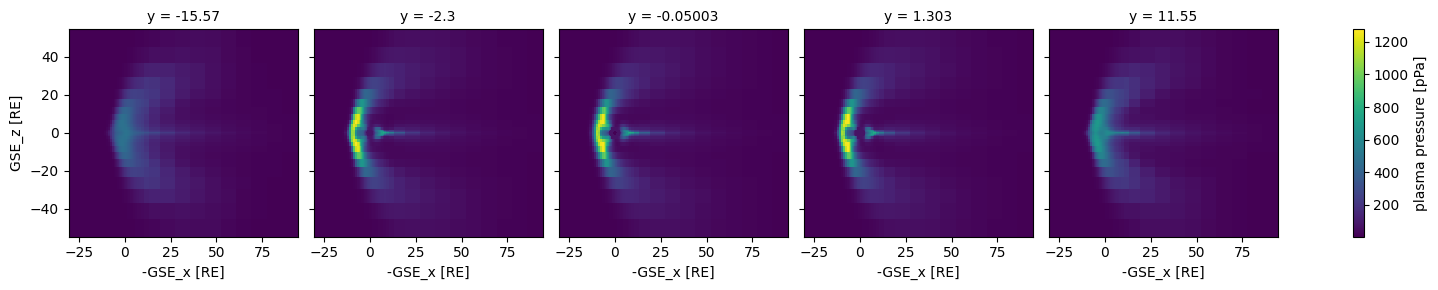
Let’s do a bunch of \(x\)-\(z\) plane cuts of the sample 3-d data, showing pressure (pp).
(Note that picking a bunch of times would make more sense, rather than a bunch of \(y\) values, but we only have sample data for a single time.)
[5]:
ds_3d = xr.open_dataset(ggcmpy.sample_dir / "sample_jrrle.3df.001200")
ds_3d.pp.sel(y=slice(-20, 20, 5)).plot(x="x", y="z", col="y");
Calculating Cross Polar Cap Potential#
[6]:
import xarray as xr

DATA_DIR = ggcmpy.sample_dir / "cir07_19970227_liang_norcm"
files = sorted(DATA_DIR.glob("*.iof.*"))
iof = xr.open_mfdataset(files)

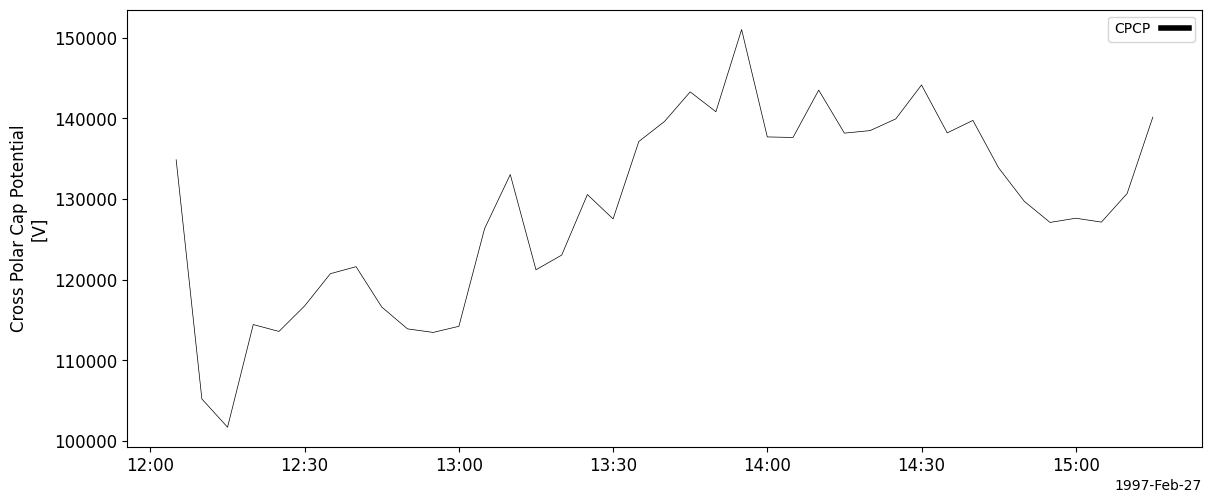
cpcp = iof.ggcm.cpcp()
cpcp
[6]:
<xarray.DataArray 'cpcp' (time: 39)> Size: 156B
array([134867.83 , 105205.875, 101696.07 , 114429.28 , 113574.31 ,
       116743.   , 120733.77 , 121602.17 , 116599.71 , 113891.266,
       113451.36 , 114209.516, 126319.875, 133029.05 , 121223.64 ,
       123038.734, 130548.81 , 127525.625, 137121.53 , 139610.44 ,
       143280.47 , 140815.66 , 151007.06 , 137692.9  , 137625.66 ,
       143495.03 , 138163.22 , 138477.53 , 139933.22 , 144133.61 ,
       138196.17 , 139740.44 , 133857.48 , 129707.45 , 127090.39 ,
       127611.05 , 127130.625, 130677.75 , 140149.05 ], dtype=float32)
Coordinates:
  * time     (time) datetime64[ns] 312B 1997-02-27T12:05:00.170000 ... 1997-0...
Attributes:
    long_name:  Cross Polar Cap Potential
    name:       CPCP
units: V[7]:
import pyspedas

import ggcmpy.timeseries

ggcmpy.timeseries.store_to_pyspedas(cpcp)
pyspedas.tplot("cpcp")
Calculating CL Index#
[8]:
cl = iof.ggcm.cl_index()
cl
[8]:
<xarray.Dataset> Size: 624B
Dimensions:  (time: 39)
Coordinates:
  * time     (time) datetime64[ns] 312B 1997-02-27T12:05:00.170000 ... 1997-0...
Data variables:
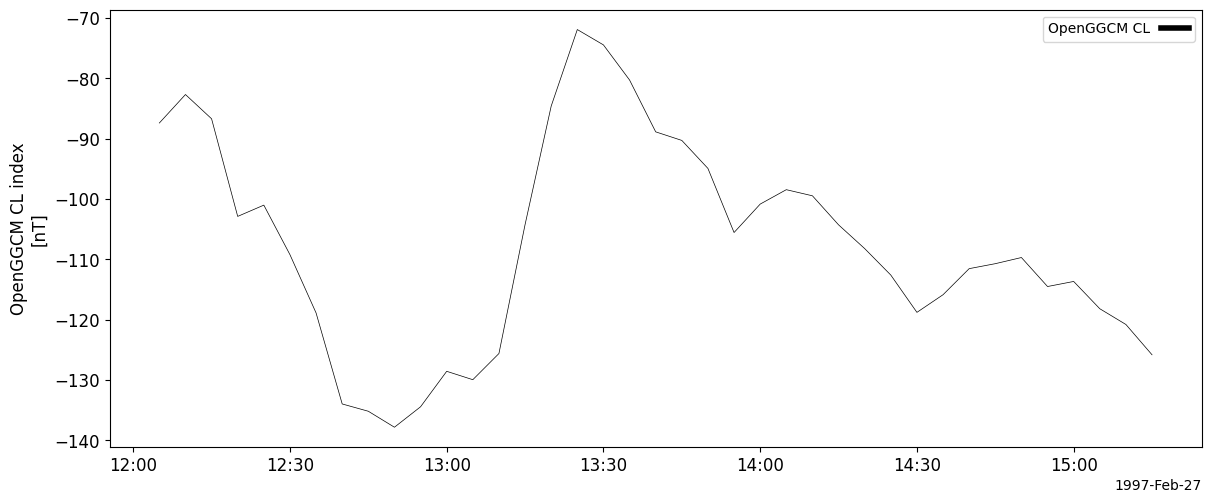
ggcm.cl (time) float64 312B -87.42 -82.69 -86.71 ... -118.2 -120.8 -125.8[9]:
ggcmpy.timeseries.store_to_pyspedas(cl["ggcm.cl"])
pyspedas.tplot("ggcm.cl")